Free
£0no account
The canvas and the simulation with every explanation, the home installation devices, the realistic view, the multimeter, exercises and a first fault board, sharing, and joining a class.
Open the simulatorBuild a circuit, switch it, break it. WireWhy calculates the current in every conductor, so you see why the RCBO trips, the MCB holds, or the lamp stays dark.
Continue your circuit →No account needed · Computers, tablets, and phones · 230 V, 50 Hz · BS 7671 words, mm² and metres
L 0.00 A · N 0.00 A · ΔI 0.00 A
The RCBO trips at a 30 mA difference.
Switch open. Nothing flows.
The lamp's neutral is on the RCBO's load neutral.
A wiring diagram shows what is connected. WireWhy works out what that wiring does: every time you add a wire, flip a switch, or put in a fault, the whole circuit is calculated again.
Devices, terminals, wires, and the state of every switch and breaker.
Supply TN-C-S 230 V
RCBO B6, 30 mA
Switch closedSteady state by modified nodal analysis with complex phasors, at the supply frequency and at every frequency the electronics add.
V at every terminal
I in every wireThe fastest protective device that should trip, trips. Then the circuit is solved again, until nothing changes.
ΔI 1.00 A ≥ 30 mA
RCBO trips after 20 msCurrents in the wires, the trip, and a finding in plain words, with the current's path marked wire by wire.
Finding: critical
wires 1 → 5Open the demo consumer unit and switch the bathroom light on. The RCBO trips, and the conductors that carry the stray current are numbered from the supply.
RCBO 30 mA tripped after 20 ms at 1.00 A cause: the lamp's neutral bypasses the RCBO
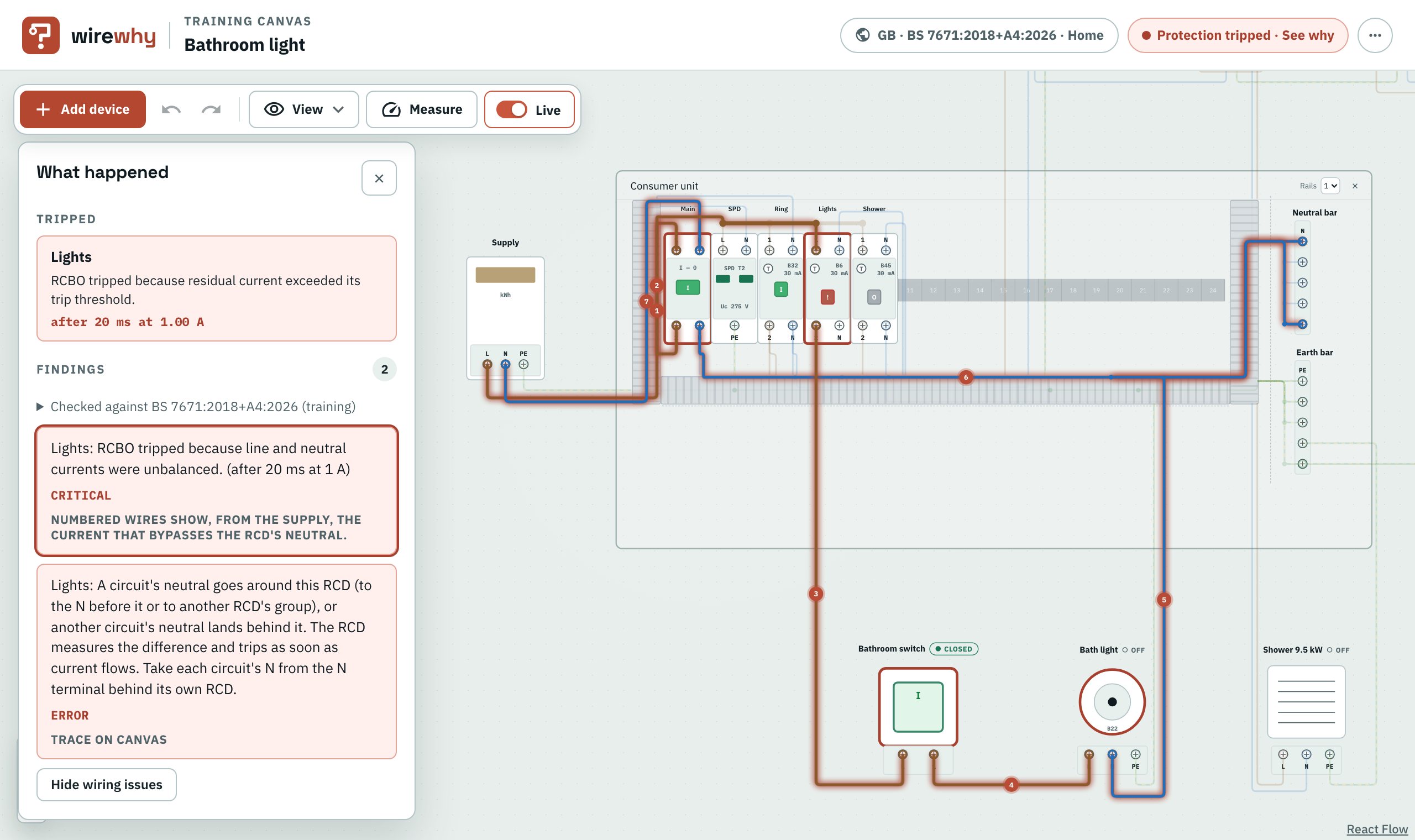
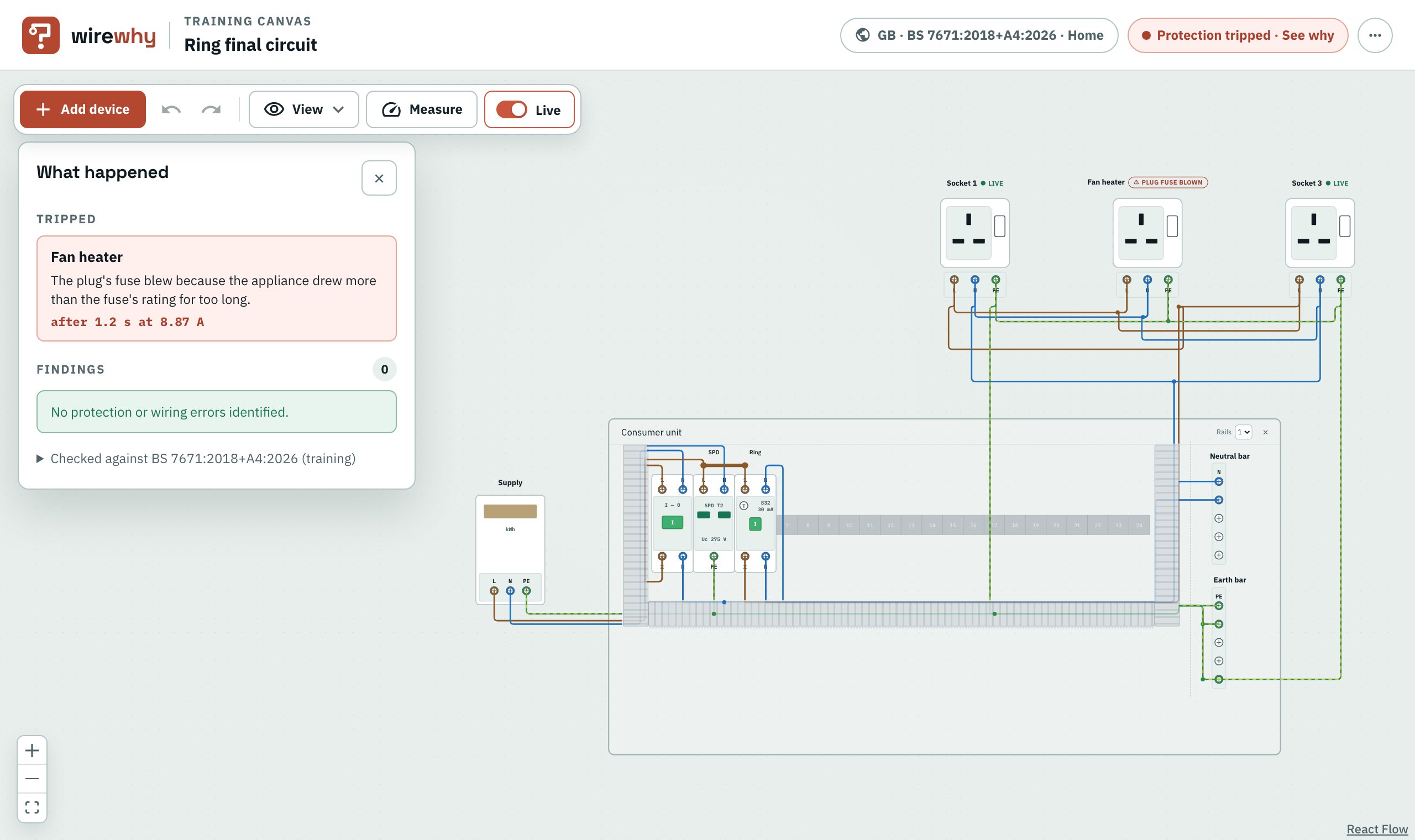
An earth fault, a short circuit, or an overload, on any device. Fit a 3 A fuse in a fan heater's plug and the plug fuse blows, while the ring's B32 RCBO stays on.
Fan heater 8.9 A on a 3 A plug fuse fuse blows after 1.2 s · B32 stays on
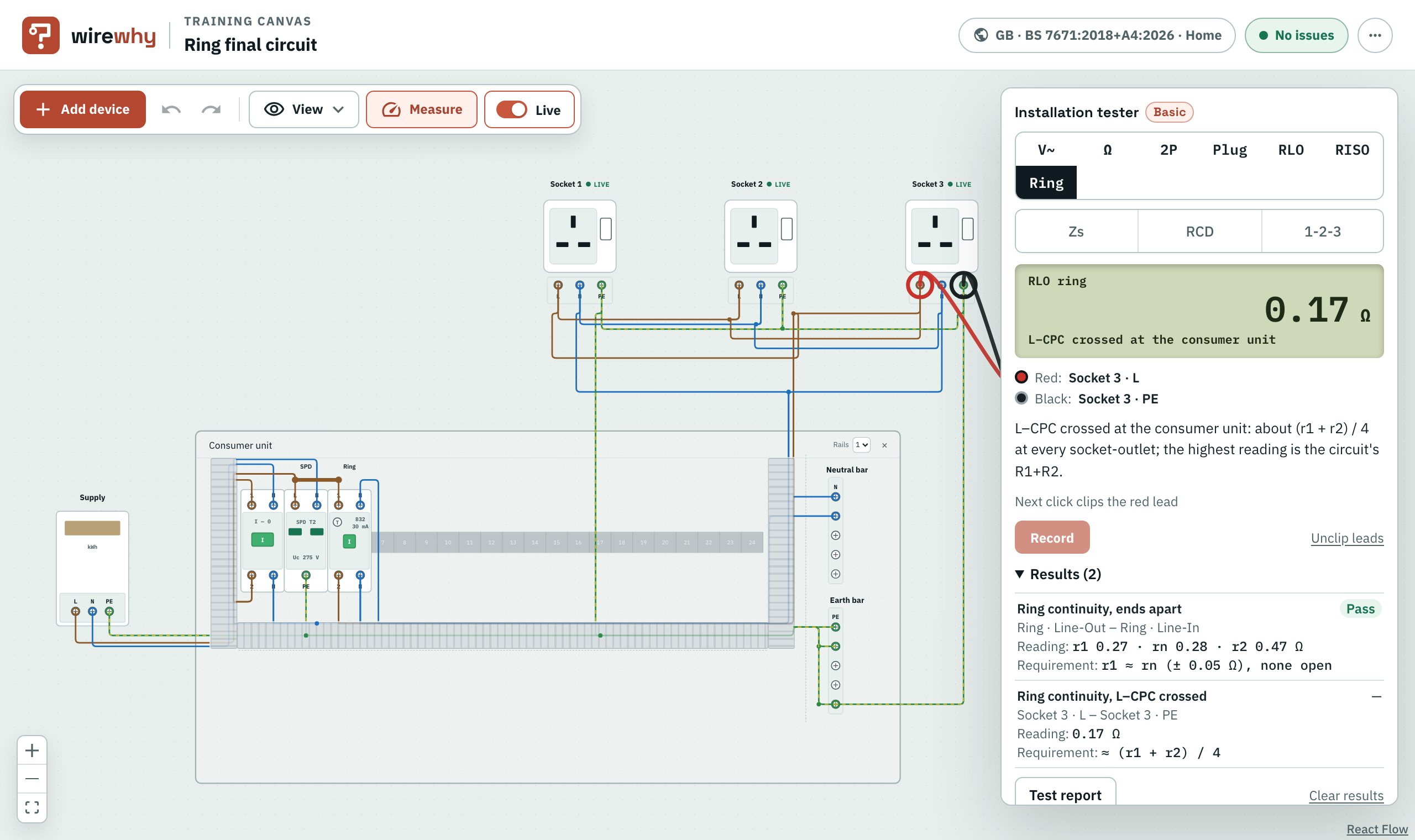
Clip the multimeter to any two terminals, or take the installation tester for continuity, the three-step ring final test, insulation resistance, and Zs. A measured Zs is held to 80% of the Table 41.3 maximum, and every reading goes into the schedule of test results.
Ring, ends apart: r1 0.27 · rn 0.28 · r2 0.47 Ω L–CPC crossed, at a socket-outlet: 0.17 Ω
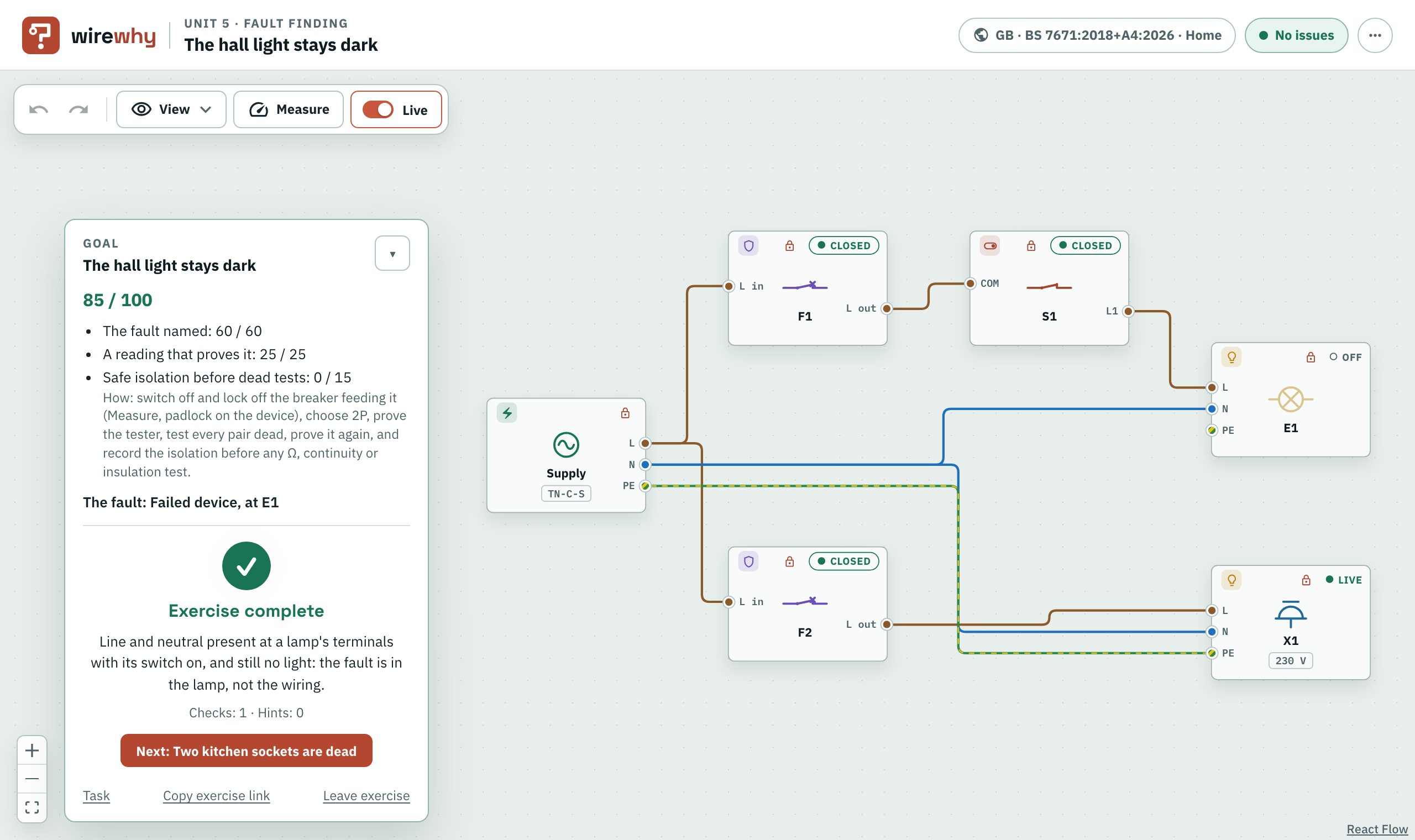
One fault is hidden in a working circuit: a failed lamp, a loose screw, a leak to earth. Switch, measure, name the device or wire at fault, and get a score for the answer, the reading that proves it, and safe isolation.
Hall light dark: lamp L–N 230 V E1, failed device: 85 / 100
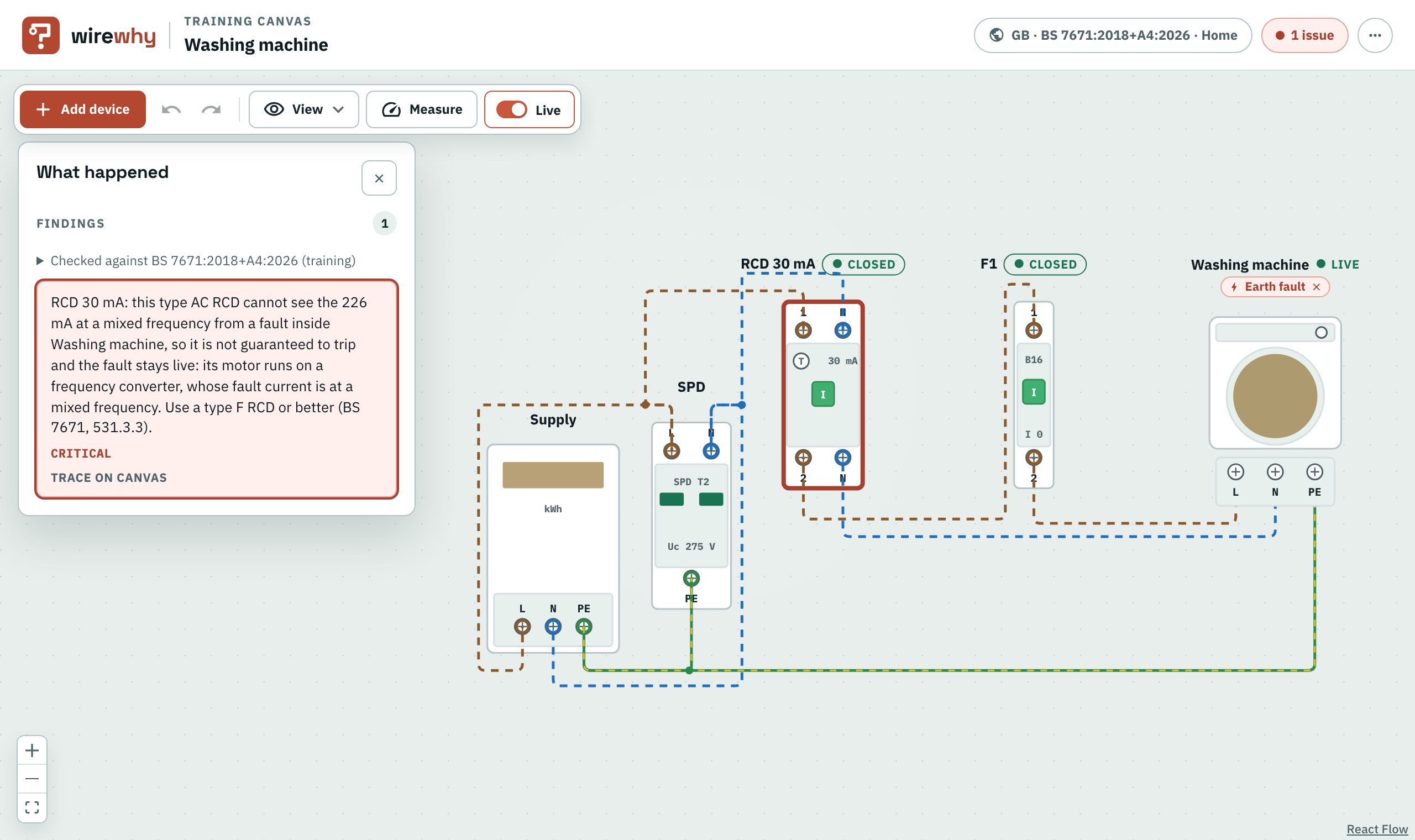
Plug a washing machine with a frequency converter into a socket behind a type AC RCD and put an earth fault inside it. The RCD stays closed: it cannot see current at a mixed frequency. Set it to type F and it trips.
RCD 30 mA type AC: stays closed mixed frequency: type F needed
Low-voltage installations as an apprentice meets them: consumer units, lighting, ring final and radial circuits, motor control, and the inspection and testing that prove them.
| Supplies | 230/400 V 50 Hz, single- and three-phase · 120/240 V, 127/220 V, and others for comparison |
|---|---|
| Countries and rules | United Kingdom (BS 7671:2018+A4:2026) · for comparison: Poland, Germany, Austria, Switzerland, Portugal, Brazil, the United States, and IEC 60364 |
| Earthing | TN-C-S (PME), TN-S, TT · the supply's PEN, split on a PEN bar in the board · the earth electrode with its RA · TT with the installation's own electrode, an unearthed TT flagged · Ze of the DNO's supply · a broken PEN · touch voltage on exposed metal |
| Protection | MCBs type B, C, D, including 40 and 45 A · RCDs and RCBOs of type AC, A, F, B: a type too weak stays closed on a DC or mixed-frequency fault · 30 mA on a home's lighting and sockets · AFDD · fuses: the BS 1362 plug fuse (3, 5, 13 A) and the cut-out fuse · selectivity · a measured Zs against 80% of Table 41.3 |
| Board | consumer unit with a main switch · energy meter · surge protection at the origin · neutral, earth, and PEN bars · DIN rails |
| Cables | twin and earth with its reduced CPC (2.5/1.5 mm²) · ring final circuits on a B32 and their spurs · cross-section, length, copper · rated by how they are installed · their resistance in the fault loop · overheating when the MCB does not protect the cable · junction boxes |
| Switching | one-way, two-way, intermediate, in one, two, or three gangs · push-buttons |
| Control | contactors that hold themselves in · interlocked reversing starters · star-delta starters · overload relays · motor protection breakers · phase monitoring relays · time relays · impulse relays · staircase timers · time on the canvas: watch it run, or skip to the next event |
| Loads | lamps on B22 and E27 · heaters, showers, and immersion heaters · BS 1363 socket-outlets with the plug's fuse · fused connection units · appliances with electronics: power supplies, a washing machine or heat pump on a frequency converter, an EV charger on a DC bus · their standing leakage adding up behind one RCD · motors, single- and three-phase, with a terminal box for star or delta · indicator lamps |
| Faults | earth fault · short circuit · overload · open or poor contact · failed device · a neutral bypassing an RCD · a neutral touching earth · a lost PEN · unearthed metal · a broken or interconnected ring · too many sockets on an unfused spur · a surge from the supply · a TT installation not earthed · an RCD type too weak for the load |
| Instruments | multimeter V, Ω · voltage indicator and safe isolation with a lock-off · socket tester · installation tester: continuity of CPCs, the three-step ring final test (r1, rn, r2, then (R1+R2)/4 at every socket), insulation resistance, Zs, RCD trip time and current, phase sequence · a schedule of test results and an Electrical Installation Certificate |
| Drawings | wiring diagram · single-line diagram · board layout · terminal plan · breaker labels |
A course from the first lamp to motor control, a lab for every device, fault boards and endless fault practice, and exam tracks for the AM2 and City & Guilds 2391. Exercises check your wiring, however you wire it.
Start the course →Show a borrowed neutral, a broken ring, or a lost PEN as often as the class needs. Build exercises that mark themselves, and let a class follow your canvas with a short code.
Check what a customer's odd wiring really does before it goes into a wall: what trips, and what stays live.
And with WireWhy Pro: describe the house or list the small tasks, and send a quote from your own prices that the customer accepts by link.
See WireWhy Pro →Circuit simulators either teach electronics at component level, or let you draw wiring without saying what the installation does. I wanted one where you could wire a bathroom light wrong, switch it on, and see why the RCD trips.
Mateusz Hinca, WireWhy
Learning is free, without an account. Plans add devices, exam practice, saved circuits, and tools for running a class.
£0no account
The canvas and the simulation with every explanation, the home installation devices, the realistic view, the multimeter, exercises and a first fault board, sharing, and joining a class.
Open the simulator£21.49for 3 months
no renewal, about £7.16 a month
Everything free, plus motors and control devices, every fault board and endless fault practice, exam-style boards, the installation tester, your circuits saved online, your course progress on your phone and computer (start on the computer at school, carry on on your phone), and short live class sessions (3 followers, 20 minutes).
Open the simulator£9.99per month
Everything in Basic, your progress on phone and computer included, plus the exercise builder with rules for learners, unlimited live class sessions, the single-line diagram export, and professional mode.
Open the simulatorPer schoolper year, by invoice
The teacher plan for every teacher at your school, one invoice, and a pilot semester for the first schools. Optional: Basic for your students at a school price.
Write to usCompare all plans → Prices in pounds sterling, VAT included. Cancel any time; refunds within 14 days. Terms · Refunds
The simulator is free: the canvas, the simulation and its explanations, the home installation devices (three-phase included), exercises, and sharing. Paid plans add motors and control devices, fault practice, exam practice, saving online, your progress on your phone and computer, and tools for teachers.
No. Open the simulator and start; your circuit stays in this browser until you share it. A pass needs no account either: pay now, and sign in later to use it on your other devices. You need an account for a subscription, and to keep circuits and course progress online.
Yes. Devices, wires, and the simulation work by touch; a larger screen is more comfortable for big circuits.
Yes. Share an exercise as a link, or start a follow-along session: the class joins with a short code and sees your canvas live.